penciive
NEWiOS app update — improved highlights & tags

What you read becomes knowledge.

Bring EPUB, PDF, web articles, social posts, and notes into one library. Highlight what matters, ask AI, and get answers grounded in what you've read.
Built for Japanese, works in English iOS & Chrome extension No credit card required
Highlighting
Penciive library
AI chat
Supported formats
EPEPUB
PDPDF
WWeb articles
𝕏X posts
UURL clips
MNotes
CORE VALUE

Everything you read, in one place.

Books, articles, posts, notes — all the scattered things you've read, unified into a single Penciive library.

Five content types,<br/>one screen.

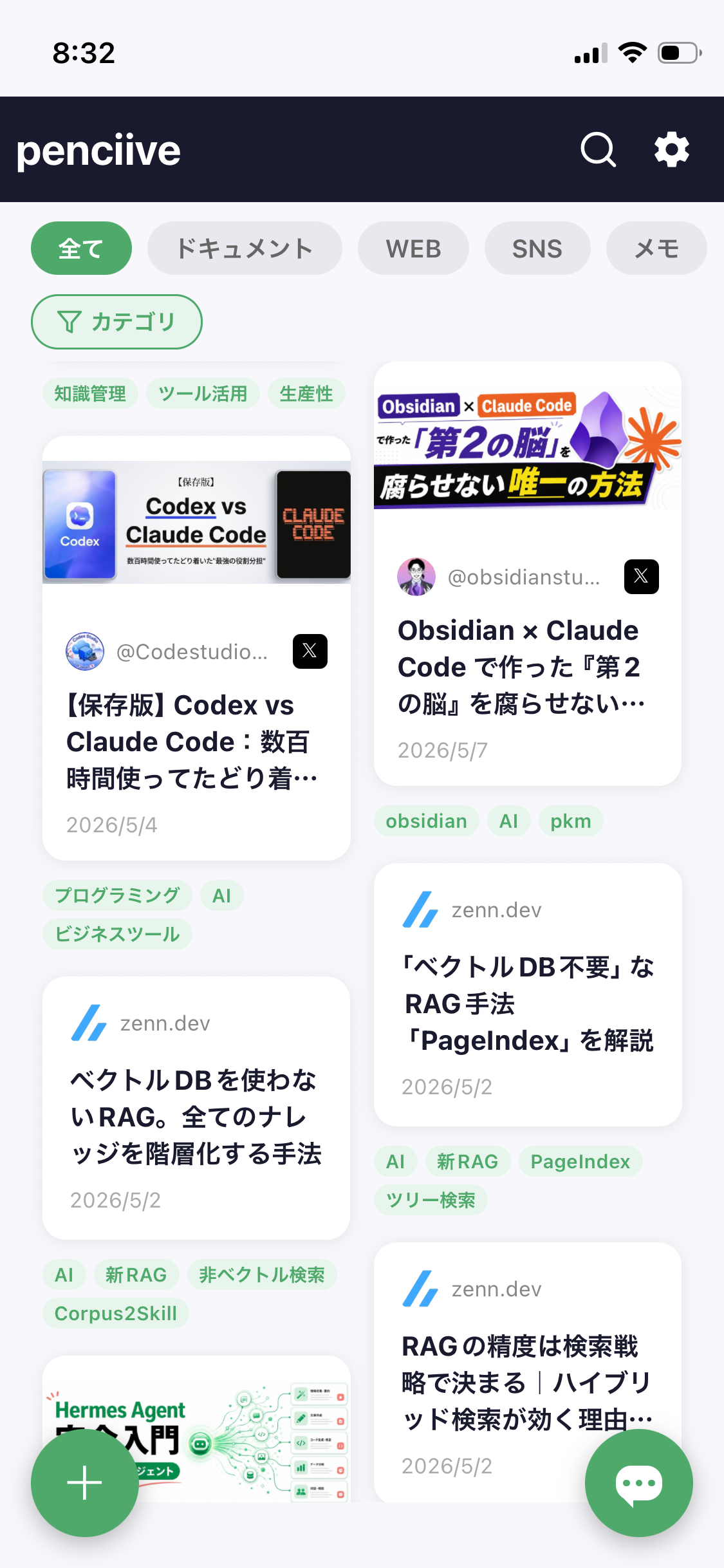
EPUB, PDF, web articles, X posts, and your own notes. Regardless of format, search and filter everything from a single tab.

  • Auto-organized by category and tag. Knowledge work, tooling, productivity — sorted by your own context.
  • Save the moment you read it via the Chrome extension or iOS share sheet.
  • Cards with thumbnail, author, and date — easy to remember later.
Library screen

Don't save for later —<br/>highlight now.

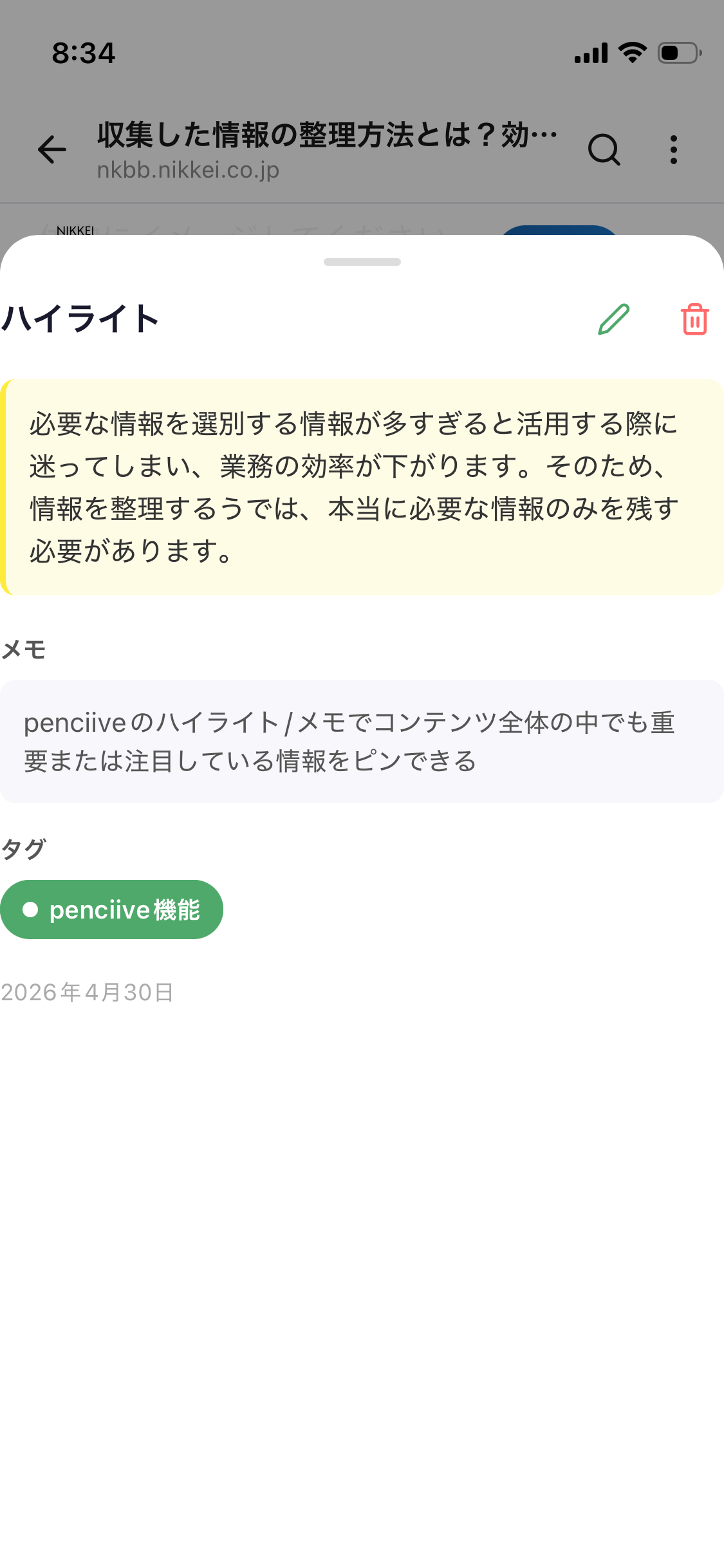
Long-press to highlight any passage. Color, notes, and tags — all in one motion, with one hand. Turn passive reading into a real knowledge asset.

  • Two-color markers (yellow = important, blue = quote) capture your intent.
  • A note field lets you jot down your interpretation in the moment.
  • Tag highlights to search across themes later.
Highlight screen

Ask AI about<br/>your own library.

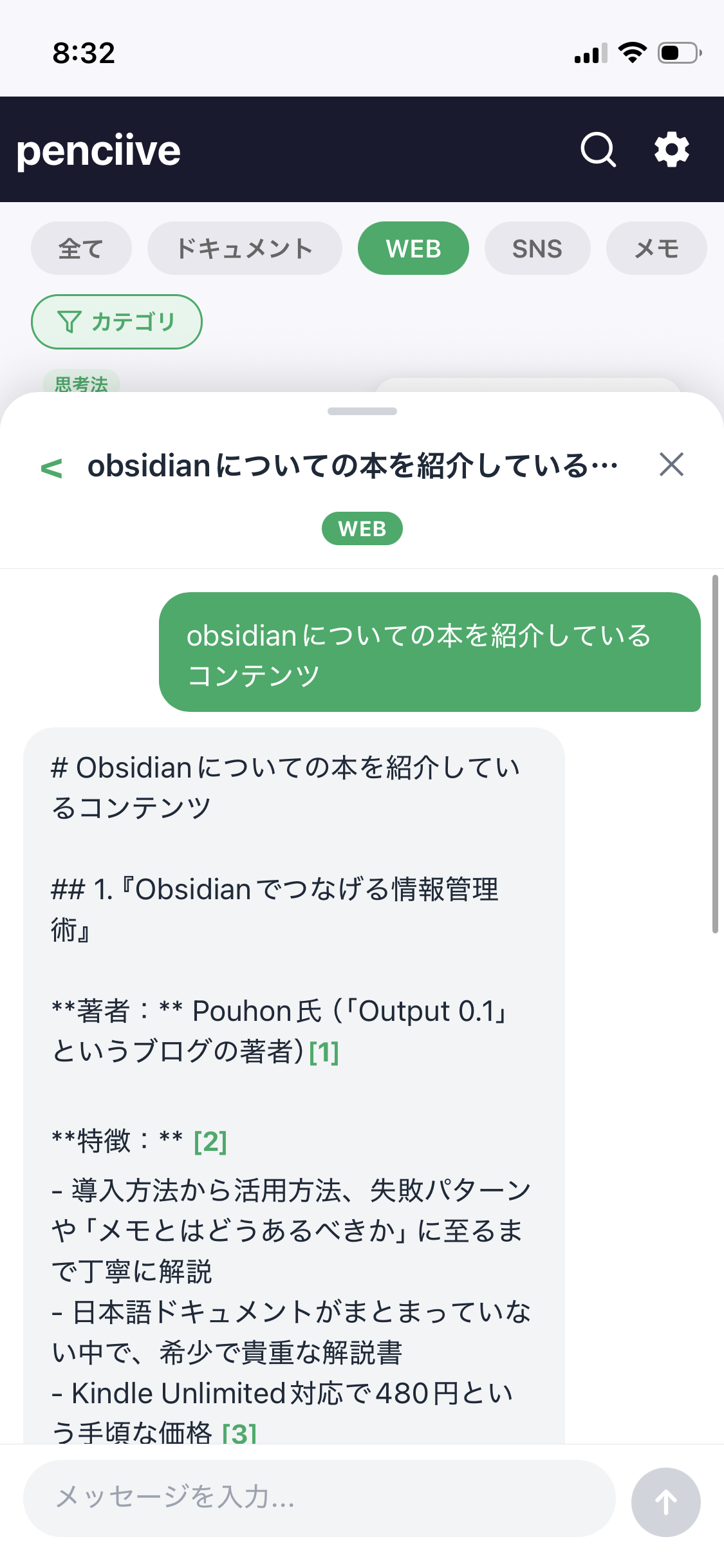
"Which of my saves mention Obsidian?" — just ask. Penciive reads only what you've saved and answers with citations. No hallucinations, a knowledge base that's truly yours.

  • Source links with every answer — the citation is always traceable.
  • Filter by category (web only, social only, notes only).
  • Keep history — resume the same question later.
AI chat screen
3 PILLARS

Read → Capture → Ask.<br/>Three actions, that's it.

AllDocumentsWEBSocialNotes
01 — READ

Read across formats.

EPUB in a proper vertical reader, PDF alongside notes, web articles in ad-free reader mode. One app, every format.

Keep only the information you need.
AI-generated notes — all "someone else's thinking".
Penciive featureAI
02 — KEEP

Highlight. Tag. Keep.

Two-color markers, notes, and tags. Turn small in-reading realizations into assets you'll actually revisit.

Tell me about my Obsidian books
1. "Information Management with Obsidian"
Author: Pouhon [1] [2]
03 — ASK

Ask your own library.

Don't re-read your archive — ask AI. RAG always shows sources, so search and thinking happen together.

HOW IT WORKS

Three steps to a second brain.

1
Just save

Reading the web? Use the share sheet. X post? Paste the URL. EPUB / PDF? Drop them in.

2
Highlight as you read

Yellow for what matters, blue for quotes. Add a note and a tag in one line.

3
Ask AI

"Summarize last week's AI articles" — query your entire library, by category, or by tag.

WHY PENCIIVE

Read-it-later isn't enough anymore.

Saving is easy. But almost no app is designed for what happens after you save — how you actually use what you've kept.

FeaturepenciiveTypical read-later appGeneral notes app
Save Web / Social / EPUB / PDF togetherPartialManual
Color-coded highlights + notes + tagsSingle color
Library-wide AI search (RAG)
Answers with source links
UI optimized for JapaneseEnglish-first
VOICES

What users say.

I used to just read articles and stack books. Now, a week later, I can actually quote what I read in conversation.

Editor, 30s
Saves about 60 web articles a month

Added it so I wouldn't lose great X threads. The AI search finds 'that one post' in a second.

Engineer, 20s
Mostly captures X posts

Being able to chat across PDF papers, news, and my own notes is genuinely powerful. The first 30 minutes of any research are gone.

Researcher, 40s
Heavy PDF + notes user
PRICING

Start free.

Try every feature without a credit card. Upgrade to Pro when you're hooked.

Free
¥0/ month

For getting started with reading.

  • EPUB reader
  • Web article saving
  • RAG embedding — up to 3 books / month
  • AI chat — up to 5 / month
Get started free
Popular
Pro
¥800/ month (annual ¥8,000)

For serious reading, capturing, and thinking.

  • EPUB reader
  • Web article saving
  • RAG embedding unlimited
  • AI chat unlimited
  • Priority support
Upgrade to Pro
FAQ

Frequently asked

Where do AI chat answers come from?

Only from the content you've saved in Penciive (web articles, X posts, PDFs, EPUBs, notes). Unlike a general LLM, it doesn't fill in with outside knowledge — every citation lives inside your library.

How is the copyright of saved content handled?

Saves are used only for your personal reading and are not shared with third parties. We do not use them for AI training.

Is there an Android or PC version?

iOS and a Chrome extension are available today. Android and a web version are on the roadmap — we'll announce via newsletter.

Can I cancel anytime?

Yes. Cancel anytime from the App Store subscription settings. Your saved content remains after cancellation.

Turn your reading into knowledge.

Download free and start by saving today's first article.

Download free on the App Store →